
The quickest path to a usable roadmap is picking an editable template that already fits your format, not building one from scratch. Choose from three proven layouts: Now–Next–Later for stakeholder alignment, a timeline for delivery dates, or a swimlane for multi-team dependencies. Grab an editable slide deck, spreadsheet, or online whiteboard template, then customize it below.
TL;DR:
- Use goal-based templates like Now–Next–Later for uncertain product bets and long-term planning, avoiding fixed dates beyond six months.
- Choose spreadsheets with dependency visualization for delivery teams to plan sprints and track parallel workstreams effectively.
- Build external-facing roadmaps with milestone-only views that omit internal jargon and exact dates to maintain trust and clarity for customers.
- Collaborate initially on whiteboards with sticky notes to refine priorities before transferring the plan into presentation or tracking tools.
- Regularly update the roadmap with real-time data from project management tools and focus on clear goals, ownership, and removing unprioritized initiatives.
Table of Contents
- Best Product Roadmap Templates by Audience and File Format
- How to Choose the Right Roadmap Template for Your Audience
- How to Customize and Present Your Roadmap Step by Step
- Common Roadmap Formats and When to Use Each
- Use a Collaborative Whiteboard to Build and Iterate Roadmaps
- Template File Formats and Quick Download Tips
- Best Practices for Maintaining and Updating Your Roadmap
- Common Pitfalls to Avoid When Using Roadmap Templates
- Examples of Successful Roadmaps Using Different Templates
- How to Integrate Roadmap Templates With Project Management Tools
- What Actually Matters When Picking a Roadmap Template
- Sources
Best Product Roadmap Templates by Audience and File Format
The template that impresses your VP will bore your engineering lead, and the one your engineers love will confuse a customer. Match the format to who’s in the room before you touch a single date field.
For executives, lean on Now–Next–Later or goal-based templates. These skip granular dates in favor of themes and outcomes, which matters because executives care about direction, not sprint numbers. A Now–Next–Later slide deck (available as editable PPT or Google Slides) works well here since it’s built for a five-minute scroll, not a deep dive. Goal-based templates that map initiatives to company OKRs are similarly effective, and they’re usually easiest to build in slide format because you need visual hierarchy, not cell-by-cell data.
For delivery teams, a swimlane or Gantt-hybrid template earns its keep. These show parallel workstreams, hard dependencies, and realistic timing, which is exactly what engineering managers need to plan sprints. Spreadsheet-based templates (Excel or Google Sheets) tend to work best here because downloadable Excel and Google Sheets roadmap templates let teams sort, filter, and update rows without touching design elements. A whiteboard-based swimlane template is a close second, particularly if the team needs to move sticky notes around in real time during planning sessions.
For customers or public audiences, strip it down to a milestone-only view. No internal jargon, no engineering ticket numbers, just what’s shipping and roughly when. This format works in either slides or a simple public-facing whiteboard export.
A few notes on format trade-offs:
- Slide decks (PPT/Google Slides) are the easiest to share broadly and present live.
- Spreadsheets are the easiest to update collaboratively without breaking layout.
- Whiteboard templates are the easiest to co-edit in real time during a planning workshop, before anything gets locked into a final format.
Expert-curated template libraries also offer feature, agile, and outcome-based roadmap examples that you can adapt rather than build from a blank page.
How to Choose the Right Roadmap Template for Your Audience
Template selection comes down to one question: who has to make a decision after seeing this? Executives need themes and confidence levels. Engineers need dates, owners, and dependencies. Customers need to know what’s coming and roughly when, nothing more.
Run through this checklist before you pick a layout:
- What’s the timeframe? Long-range bets (six months or more) belong in Now–Next–Later, not a dated Gantt chart.
- How much detail does this audience need? Executives want three to five themes; engineering wants every ticket mapped to a milestone.
- Do dependencies matter here? If one team’s work blocks another’s, use a swimlane or timeline that shows the relationship visually.
- Is this going outside the company? Public and customer-facing roadmaps should never show internal dates, only milestone commitments.
A quick do and don’t: do use Now–Next–Later when your product bets carry genuine uncertainty. Don’t slap hard dates on a roadmap eighteen months out just because a template has date columns. That habit is how roadmaps become promises nobody can keep. Templates should be adapted per audience, since executives need goal-focused views while engineering needs delivery-focused timelines with dependencies.
How to Customize and Present Your Roadmap Step by Step
A template is a shell. What makes it yours is the goals you attach to it and the story you tell around it. A roadmap works best as a living document that explains what you’re building, when, and why, and the “why” carries as much weight as the “what,” according to Aha!’s roadmap guidance.
Here’s the sequence that works:
- Start with goals, not features. Write down the two or three outcomes you’re driving toward this quarter or year before you fill in a single initiative.
- Map each initiative to a goal. If an item on your roadmap doesn’t connect to one of those outcomes, question whether it belongs there at all.
- Assign an owner to every row. Unowned initiatives are the first thing that stalls in a stakeholder review.
- Populate priority and status fields. Use Now/Next/Later tags or simple status colors (on track, at risk, blocked) rather than exact percentages that nobody trusts anyway.
- Add visual cues for dependencies and risk. A red flag icon or a dotted connector line does more work than a paragraph of notes.
When you present, open with a single overview slide, then zoom into the two or three initiatives that matter most to that specific audience. End by asking for one decision or one piece of feedback, not a general “thoughts?”
Pro Tip: Keep text on each roadmap item under ten words. If you need a full sentence to explain an initiative, put that detail in speaker notes or a linked doc, not on the visual itself.
For teams running this as a live session, remote facilitation techniques built for digital collaboration translate surprisingly well to roadmap workshops.
Common Roadmap Formats and When to Use Each
Eleven distinct visual layouts show up regularly across roadmap tools and template libraries, but four cover the vast majority of real use cases, according to SlideUpLift’s roadmap design breakdown.
- Now–Next–Later works when timelines are genuinely uncertain and you want to avoid overcommitting to dates. It’s the default choice for executive updates and early-stage products where priorities shift quarter to quarter.
- Timeline/Gantt-hybrid fits delivery teams that need actual dates and visible dependencies between workstreams. Engineering leads and program managers lean on this format because it doubles as a planning tool, not just a communication one.
- Swimlane and feature timelines handle multi-team views where several squads are shipping in parallel and stakeholders need to see how the pieces interlock.
- Heatmaps and portfolio views give a fast read on status across an entire product portfolio using color-coded risk and progress, which works well when leadership oversees multiple products and doesn’t need granular dates for any single one.
Pick the layout by asking what decision the viewer needs to make, then work backward.
Use a Collaborative Whiteboard to Build and Iterate Roadmaps
Slide decks are great for presenting a finished roadmap. They’re terrible for building one collaboratively in real time. That’s where a whiteboard earns its place in the process: real-time cursors, movable sticky notes, and an infinite canvas let a room full of stakeholders rearrange priorities without anyone hoarding the mouse.

Whiteboards speed up collaborative roadmap workshops and let teams iterate visually before locking anything into a final slide format, based on Aha!’s observations on roadmap workflow. Onlinewhiteboard supports this exact workflow: teams sketch a rough Now–Next–Later grid, drag sticky notes between columns as priorities shift mid-discussion, and only export to slides once the room actually agrees.
A practical sequence looks like this:
- Run the workshop live on a shared whiteboard canvas.
- Draft the roadmap in real time using sticky notes and simple shapes for initiatives.
- Circulate the draft for asynchronous stakeholder comments before the next meeting.
- Export the finalized layout into a polished slide deck for the executive presentation.
This approach keeps early-stage messiness where it belongs, off the version you actually present. Onlinewhiteboard’s collaborative whiteboard platform is built for exactly this kind of live, multi-person editing session.
Template File Formats and Quick Download Tips
Each file format has a job it does best, and picking the wrong one creates friction you’ll feel for weeks.
- PowerPoint and Google Slides win for presentation polish and easy sharing with anyone, technical or not. Slide marketplaces and design sites offer PowerPoint roadmap templates and presets that are ready to present with minimal editing.
- Excel and Google Sheets win when the team needs to sort, filter, or bulk-edit rows of initiatives, especially for delivery-focused roadmaps with many line items. Template libraries commonly offer downloadable Excel, PDF, and Google Sheets roadmap templates built for this purpose.
- Whiteboard templates win for collaborative drafting before anything is finalized, particularly in workshop settings.
Before downloading anything, verify it’s genuinely editable and not a locked PDF preview. When converting between formats, export whiteboard frames as images or PDFs first, then rebuild the layout in slides using a consistent master slide so fonts and colors don’t drift between initiatives.
Best Practices for Maintaining and Updating Your Roadmap
A roadmap that never changes isn’t a roadmap, it’s a museum piece. Treat it as a living document you revisit on a fixed cadence, not something you build once for a big meeting and abandon.
Set a monthly or biweekly review where you update status fields, adjust Now/Next/Later placement as priorities shift, and remove initiatives that quietly died somewhere between planning and execution. Assign one person as the roadmap owner. Without a clear owner, updates fall through the cracks and stakeholders start trusting the roadmap less with every passing quarter.
Keep a version history, even an informal one, so you can show leadership how priorities evolved and why. This matters more than it sounds: when an executive asks “why did this initiative disappear,” a dated version trail answers the question in seconds instead of triggering a defensive scramble.
Separate your internal working roadmap from any external or customer-facing version. Update the internal one frequently since it drives real decisions. Update the external one less often and only after commitments are solid, since public roadmaps that slip repeatedly damage trust faster than no roadmap at all.
Finally, resist the urge to over-engineer the update process. A simple recurring calendar hold and a shared template beats an elaborate review workflow that nobody actually follows past the second quarter.
Common Pitfalls to Avoid When Using Roadmap Templates
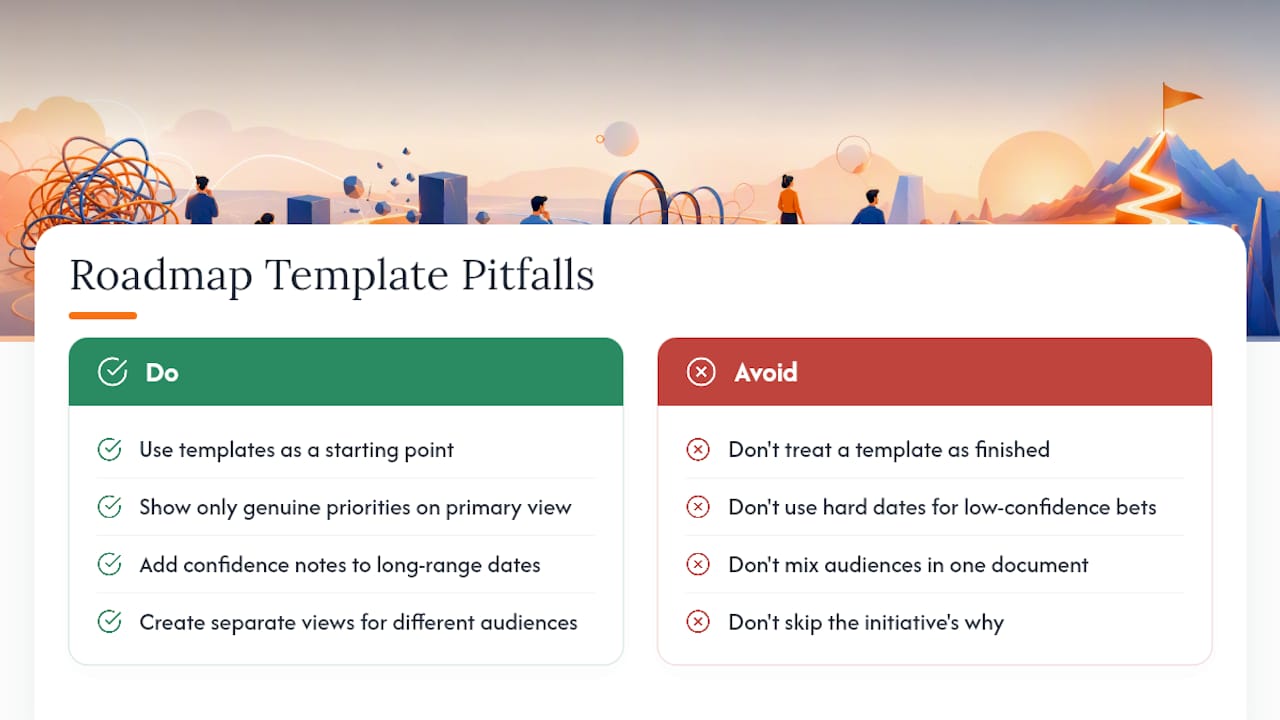
The biggest mistake is treating a template as a finished product instead of a starting point. Downloading a polished Gantt chart and filling in dates you’re not confident about creates a roadmap that looks authoritative and misleads everyone who reads it.
A second common trap: overloading a single slide with every initiative your team is considering. A roadmap crowded with fifteen line items communicates nothing, because nobody can tell what actually matters. Cut ruthlessly. If it’s not a genuine priority, it doesn’t belong on the primary view, even if it’s real work happening somewhere.
Watch for these specific issues:
Using hard dates on long-range, low-confidence bets creates false precision. When you must show dates, pairing outcome-based initiatives with a confidence note is safer than committing to a specific quarter you’re not sure about.
Mixing audiences in one document is another frequent misstep. A roadmap built for engineering, full of ticket numbers and sprint labels, confuses executives and alarms customers if it ever leaks externally. Build separate views from the same underlying plan instead of forcing one template to serve three audiences.
Skipping the “why” is the quietest pitfall of all. A roadmap listing only feature names without context reads as a to-do list, not a strategy. Every initiative should tie back to a goal someone can actually explain out loud.
Examples of Successful Roadmaps Using Different Templates
A software company scaling from seed to Series B often shifts from a single flat feature list to a Now–Next–Later format specifically because investors and new hires need to see direction, not a backlog. The shift itself signals maturity: uncertainty gets acknowledged instead of hidden behind fake dates.
Delivery-heavy engineering organizations tend to succeed with swimlane templates when multiple squads ship interdependent features. Seeing that Team A’s API work blocks Team B’s frontend release, laid out visually, prevents the kind of surprise slippage that turns a two-week delay into a two-month one.
For portfolio-level oversight, companies managing several products lean on heatmap views that show status and risk across the whole lineup at a glance. This format shines specifically because it sacrifices detail intentionally, since a heatmap showing initiative status across products with color-coded risk gives leadership a fast read without demanding they parse individual sprint plans.
Public-facing product roadmaps that stick to milestone-only views, without granular dates, tend to age better publicly. Customers see direction and rough sequencing without a company having to publicly walk back a missed date, which happens constantly when internal timelines leak into external commitments.
How to Integrate Roadmap Templates With Project Management Tools
A roadmap that lives disconnected from your actual project management tool becomes stale within weeks, because nobody wants to update two systems for one plan.
The most reliable pattern is treating the roadmap template as the strategic view and your project management tool (Jira, Asana, Linear, or similar) as the execution layer underneath it. Initiatives on the roadmap should map to epics or projects in your PM tool, so status changes at the execution level can roll up into roadmap updates without manual duplication.
If your roadmap lives in a spreadsheet, set a recurring habit of pulling status directly from your PM tool’s reporting view rather than asking each team lead to self-report separately, since self-reported status tends to lag reality. If it lives in slides, treat the deck as a snapshot you refresh monthly using current data pulled from the PM tool, not a document you edit live during meetings.
Whiteboard-based roadmaps work well as the drafting and workshop layer, sitting upstream of both. Once a plan takes shape on the whiteboard, transfer the finalized structure into your PM tool for execution tracking, then into slides for presentation. Each tool does one job: whiteboard for collaborative drafting, PM tool for execution, slides for communication.
What Actually Matters When Picking a Roadmap Template
Most roadmap advice fixates on finding the “best” layout, as if one template format could serve every meeting a product manager walks into. That’s backward. The real skill is matching format to audience fast, then being disciplined about updating whatever you chose.
Conventional wisdom oversells detail. Teams load roadmaps with dates, ticket numbers, and dependency arrows because it looks thorough, but a crowded roadmap actually communicates less than a sparse one. Executives don’t want your engineering detail, and customers definitely don’t want your internal ticket IDs.
What deserves more attention: the collaborative drafting stage. Most roadmap failures trace back to a plan built in isolation by one person and then presented as finished. Building it live on a shared whiteboard, letting stakeholders move initiatives around before anything’s locked into slides, catches disagreements early instead of during the actual executive review.
Prioritize the audience question first, the format second, and the polish last. Get that order backward and you’ll spend hours perfecting a Gantt chart nobody asked for.
— A
Ready to draft your next roadmap with your team in real time? Try Onlinewhiteboard to sketch, iterate, and align on priorities together before you ever open a slide deck.
Sources
- Product Roadmap Examples: 6 Visuals for PMs — Aha!
- 11 Best visual roadmap ideas & design examples — SlideUpLift
- Free Product Roadmap Template – Excel, PDF, Google Sheets | HubSpot
- 7 Expert-Vetted Product Roadmap Examples + Templates — Product School