
The best remote whiteboard icebreakers are short, visual, and easy to answer: one shared canvas, one clear prompt, and two to ten minutes of everyone adding something at once. Think “One Word” boards, mood maps, “Guess Who?” facts, and drawing prompts. Below you will find ten activities, how long each takes, which group size suits it, and how to run it so quieter people join in.
TL;DR
- Pick a prompt that takes under a minute to answer, then let everyone add to the whiteboard at the same time rather than speaking one by one.
- Keep icebreakers to 2 to 10 minutes for most meetings, and give a short debrief so the activity leads somewhere.
- Groups of about 10 or fewer can stay together; split larger groups into breakout rooms of roughly 5 to 7 people.
- Say that participation is voluntary and demonstrate the first answer yourself before anyone else adds theirs.
- Prepare the board before people arrive, with the prompt, a sample answer, and written instructions on the canvas.
Table of Contents
- Why a whiteboard makes icebreakers work online
- Set up the board before anyone joins
- Ten remote whiteboard icebreakers
- Which icebreaker fits your group size and setting
- How to run an icebreaker from start to finish
- Make every icebreaker welcoming
- Our perspective on whiteboard icebreakers
- Try it on a free canvas
- A ready-to-use 10-minute opener
- FAQ
- Sources
Why a whiteboard makes icebreakers work online
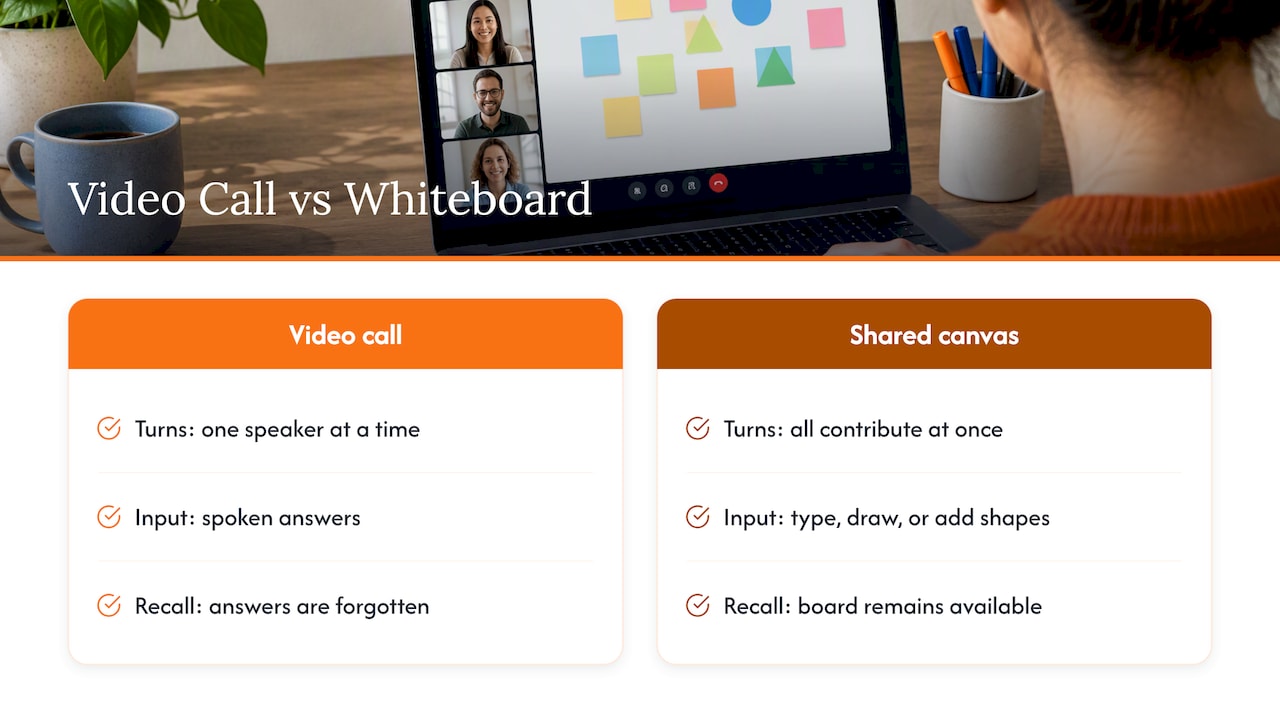
A video call forces turn-taking. One person speaks, everyone else waits, and the people who need a moment to think often never get in. A shared canvas removes that bottleneck. Everyone can type, draw, or drop a shape at the same moment, and the result is a visible picture of the group rather than a string of forgotten answers.
The whiteboard also gives you something to refer back to. When you later open a brainstorm or a lesson, the board from the icebreaker is still there, showing who likes what, who is where, and what the group has in common.
There is a practical reason to do this on purpose. Remote teams miss the hallway chats and body language of an office, which is why structured warm-ups matter more online than in person. Video platforms offer their own built-in whiteboards where the host shares a canvas and all participants can annotate by drawing or typing. A browser whiteboard that anyone can open from a link does the same job without asking people to sign in to anything first. For details on that setup, see our guide to using a whiteboard in Google Meet without installing anything.
Set up the board before anyone joins
Five minutes of preparation decide whether the icebreaker feels smooth or chaotic. Do this before the meeting starts:
- Write the prompt at the top of the board in large text, so late joiners can read it without asking.
- Add your own answer first. Modeling the activity with a small sample is a reliable way to make complex online instructions clear. Seeds for Change recommends trying an exercise with a small group before asking everyone to do it, and writing the instructions down so participants can refer to them on their own.
- Divide the canvas into zones if the activity needs them: a column per person, a grid, a map, or a scale from one end to the other.
- Test the share link in a private window so you know people can edit without an account.
- Plan the exit. Decide the one question you will ask when time is up, such as “What surprised you?”
If anyone on your team is new to drawing on a digital canvas, send them our practical guide to drawing on a whiteboard online ahead of time.
Ten remote whiteboard icebreakers
Each activity below includes timing, a suggested group size, and exactly what to put on the board. The times are our own planning estimates for typical groups, and the figures cited from published guides are linked where they appear.
1. One Word
Time: about 2 to 5 minutes. Best for: the start of a meeting or workshop.
Post the meeting topic in the middle of the canvas. Ask each person, or each pair or small group, to choose one word that describes how they think about it and place it on the board. A workshop guide from Facilitator describes the same format: pairs or small groups pick one word for the topic, work for about two minutes, and place the words on a physical or digital whiteboard for discussion.
After everyone adds a word, group the repeats and read out the outliers. A project kickoff that shows “nervous”, “clear”, and “overdue” side by side starts a more honest conversation than “any questions?”
2. Mood Weather Map
Time: 3 to 5 minutes. Best for: weekly standups and class openers.
Draw four or five weather symbols on the board: sun, partly cloudy, rain, storm, rainbow. Each person drops a sticky note with their name under the symbol that matches their day. No explanation is required, but anyone who wants to say more can. It takes the pulse of the room in seconds and tells a manager or teacher who might need a lighter load.
3. Draw Your Mood
Time: 5 to 15 minutes. Best for: small to mid-sized groups that enjoy a creative start.
Give everyone one minute to sketch how they feel using only shapes and colors. No faces, no words. Then invite volunteers to explain their drawings. SessionLab lists this format as suited to 2 to 20 people and rated low difficulty, which matches our experience that it needs no artistic skill, just a willingness to scribble.
4. Guess Who?
Time: 10 to 15 minutes. Best for: new teams and classes that do not know each other yet.
Before the session, ask participants to send one unusual fact about themselves. Paste the facts onto the canvas, unlabeled. In the meeting, the group guesses who wrote each one by dragging a name tag next to it. In the facilitator version of this game, the author can then elaborate if they feel comfortable doing so.
The key rule: facts must be things people are happy to share. “I once met a famous chef” works. Anything personal or sensitive does not.
5. Same and Different
Time: about 5 minutes in groups, plus sharing. Best for: classes, cohorts, and cross-functional teams.
Split the group into small breakouts. Each group has five minutes to list on its own board what they share and what makes each person unique. One published classroom version has groups list common interests and distinct experiences on an online whiteboard, then share it with the full class. Each team then reads out the most surprising item. People find overlaps they did not expect, such as three colleagues who all play the same instrument.
6. Where in the World?
Time: 3 to 5 minutes. Best for: distributed teams across time zones.
Paste a world or US map as the board background. Everyone drops a pin or a sticky note where they are, where they grew up, or where they would rather be today. Ask two people to share a favorite local spot. It gives remote workers a real sense of where colleagues live and makes time zone conversations less abstract.
7. This or That Spectrum
Time: 5 to 8 minutes. Best for: classes and tutoring groups that need movement.
Draw a horizontal line with two options at the ends: mountains or beach, early bird or night owl, sweet or savory. Each person moves their name tag along the line to show where they sit. Run four or five rounds quickly, and keep the prompts light. It works as a digital version of standing in different parts of a room, and nobody is singled out.
8. Pictionary on the Canvas
Time: 10 to 15 minutes. Best for: groups with some energy to spend.
One person gets a word privately, via direct message, and draws it on the board while the others guess in chat. A 15-minute virtual game can be split into 2 minutes for setup, 8 minutes of easy rounds, and 5 minutes for a final round and wrap-up. Choose words related to your work, such as “deadline”, “handoff”, or “roadmap”, so the laughter also reinforces shared vocabulary. Our collection of online whiteboard games for class has more drawing and guessing formats you can adapt for teams.
9. Chat Waterfall With a Visual Twist
Time: 3 to 5 minutes. Best for: large groups.
In a chat waterfall, everyone types an answer and waits for the host’s signal to send at once. Adapt it for the whiteboard: everyone types into a note on the canvas and the host says “post”. The wave of answers appears together, so nobody is influenced by the first reply. It is especially good when a group is large and a round of spoken introductions would eat the whole meeting.
10. Fast Friends in Pairs
Time: 3 to 5 minutes per round, up to 45 minutes for a full session. Best for: teams that want to build deeper trust over time.
Pairs or trios answer a series of questions that go gradually from light to personal, such as “What is your favorite meal?” then “What is something you are proud of?” The Wharton Executive Education guide on virtual connection describes this exercise with rounds that can run 10 minutes or be shortened to 3 to 5 minutes, and full sessions of 45 minutes. Give each pair a small zone on the board to jot down a keyword from their partner’s answers. Afterward, each person introduces their partner using the keywords.
Which icebreaker fits your group size and setting
Choosing the right activity is mostly about headcount and time. Use this table as a starting point.
| Activity | Group size | Time | Best setting |
|---|---|---|---|
| One Word | 4 to 30 | 2 to 5 min | Kickoffs, workshops |
| Mood Weather Map | Any | 3 to 5 min | Standups, classes |
| Draw Your Mood | 2 to 20 | 5 to 15 min | Creative sessions |
| Guess Who? | 6 to 20 | 10 to 15 min | New teams, cohorts |
| Same and Different | 6 to 40 (in breakouts) | 5 min plus sharing | Classes, cross-team calls |
| Where in the World? | Any | 3 to 5 min | Distributed teams |
| This or That Spectrum | 5 to 30 | 5 to 8 min | Classes, tutoring |
| Pictionary | 4 to 15 | 10 to 15 min | Social meetings |
| Chat Waterfall | 15 or more | 3 to 5 min | Large calls |
| Fast Friends | Pairs within any size | 3 to 45 min | Team building |
Group sizes are our own suggestions, and the published figures behind them are cited above. For splitting, the Ohio State University Digital Icebreaker and Teambuilder Guide advises that groups of 10 or fewer can stay together, while larger groups should move into breakout rooms of about 5 to 7 people.
For product managers and project teams
Prefer the activities that feed straight into the work: One Word on the topic of the planning session, the Mood Weather Map before a retrospective, or a quick “Draw Your Mood” before a hard conversation. Keep it under five minutes, because product teams tend to guard their agenda. Our guide to online whiteboard tools for teams covers how to set up boards that carry from icebreaker to roadmap in one session.
For teachers and tutors
Use This or That, Same and Different, and Guess Who?, which let students take part without being put on the spot. A quick drawing round also helps younger learners get comfortable with the tools before the real lesson starts. One-to-one tutors can simplify to a two-question version: one mood marker and one “what do you want to get better at today?” note.
For large all-hands calls
Stay with the chat waterfall and polls. For large remote groups, a published guide suggests combining polls, breakout rooms, and chat-based icebreakers so everyone can take part. Keep any one block of large-group activity short, and split sessions into small rounds rather than a long unbroken stretch.
How to run an icebreaker from start to finish
A good rhythm for a short icebreaker is simple. In a 15-minute version, use about 2 minutes to explain, 8 to play, and 5 to wrap up. That is close to the structure published for 30-minute team activities, which suggests a setup of 3 to 5 minutes, play of 15 to 22 minutes, and a debrief of 3 to 8 minutes. Scale it down for a two-minute check-in: 20 seconds to explain, 90 seconds to play, 10 seconds to ask “what did you notice?”
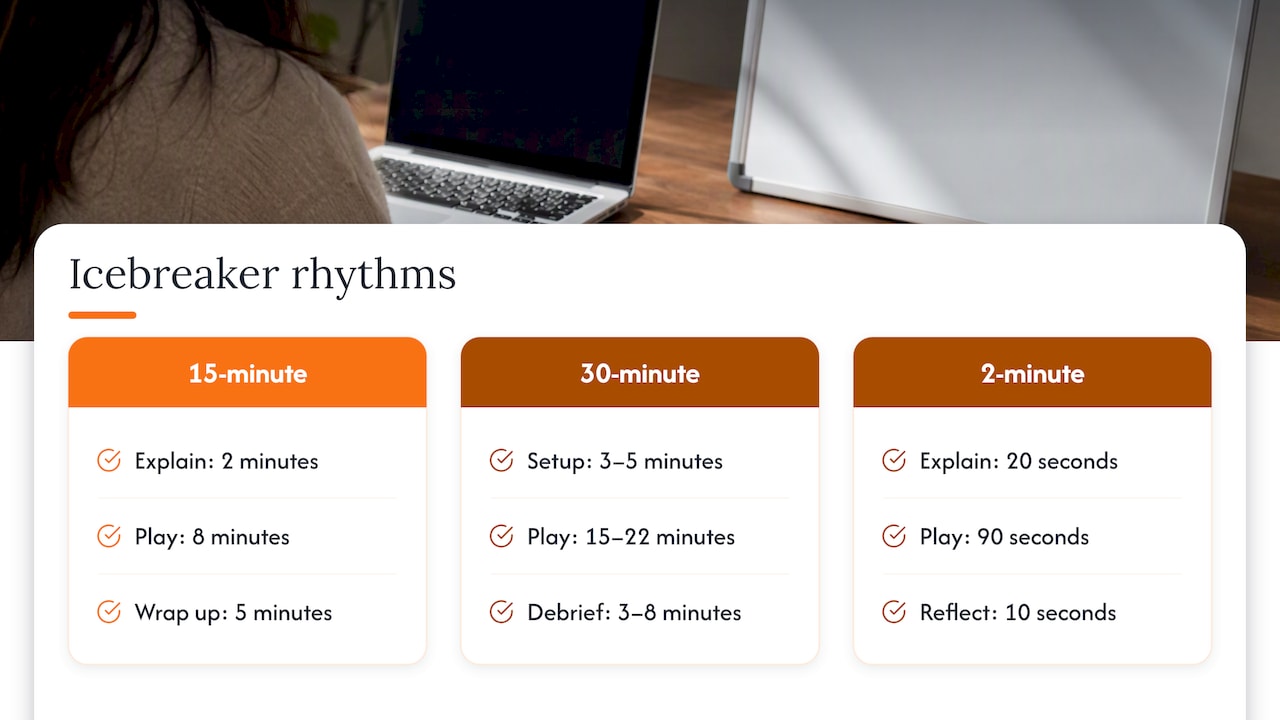
That debrief is not a luxury. The same source argues that skipping the final reflection turns an activity into a simple break rather than a developmental exercise. A single question is enough: “What did you notice about the board?” or “Who shared something with you?”
For longer workshops, remember the wider session length. The Harvard Center for Digital Thriving calls 60 to 75 minutes a sweet spot, noting that shorter sessions can feel rushed and longer ones tire participants. Treat the icebreaker as a small slice of that, not a main event. The same playbook advises keeping a semi-structured plan, because sessions often evolve differently than you expect, so leave a little slack.
Make every icebreaker welcoming
An icebreaker that makes someone feel exposed does the opposite of its job. A few habits prevent that.
- Explain the purpose. Say why you are doing it: “to get everyone’s voice on the board before we start.”
- Make it optional. Wharton’s guidance recommends setting expectations for confidentiality, explaining the activity’s purpose, and making clear that participation is voluntary, including that people may skip parts.
- Use small groups for quieter people. Harvard Business Publishing notes that breakout rooms give quieter students a lower-pressure setting to contribute and make classes more interactive.
- Offer more than one way to answer. Some people prefer typing, some drawing, some a pre-made emoji. Put all three options on the board.
- Keep prompts safe. Avoid questions about family, health, money, or politics, and stay away from anything that depends on a shared cultural reference.
- Agree on board manners. Don’t move or delete other people’s notes. Our piece on whiteboard etiquette for teams and educators lays out simple ground rules you can paste into the corner of the canvas.
If some participants join from phones or low-bandwidth connections, choose an activity that needs only a text note or a single tap, such as the Mood Weather Map, rather than detailed drawing.
Our perspective on whiteboard icebreakers
We build OnlineWhiteboard.co around one idea: the first minute of a session should not be spent on logistics. Icebreakers are where that idea matters most. If a team has to download software, create accounts, or hunt for a link, the energy you are trying to build is gone before the first prompt appears.
That is why we focus on instant access and simplicity. A host opens a board in the browser, shares the link, and everyone can start drawing, writing, and diagramming within seconds, on a laptop, tablet, or phone. For an icebreaker, that speed is the whole point. A two-minute activity only works if it takes under a minute to start.
We also believe the best icebreakers are not detached from the work. A word cloud on the board can become the first column of a workshop, and a map of where everyone lives can become a time zone plan. Because the canvas is flexible and zoomable, the icebreaker and the real session can live in the same space, and the group never has to switch tools.
Our advice to teachers, tutors, product managers, and remote teams is the same: keep it short, make it visual, let everyone contribute at once, and always leave one minute to talk about what appeared on the board.
A
Try it on a free canvas
Want to test an icebreaker before your next call? Open a blank board at OnlineWhiteboard.co, paste your prompt, and send the link. There is nothing to install, and participants can join from any device. If you are weighing options for a regular team ritual, our overview of the best online collaborative whiteboard platform explains what to look for.
A ready-to-use 10-minute opener
If you want a plan you can copy today, here is one that suits most weekly team meetings:
- Minute 0 to 1: Share the board link and read the prompt out loud. Point at your own sample answer.
- Minute 1 to 3: Everyone adds a one-word answer to “How is your week going, in one word?” and picks a weather symbol.
- Minute 3 to 4: Group repeated words. Read two or three out and thank people for adding them.
- Minute 4 to 8: Run a single This or That round with three questions, where people slide their name tags along the line.
- Minute 8 to 10: Ask one debrief question: “What did you notice about how we are doing?” Then move on to the agenda.
For a class, swap the weather symbols for a topic-related prompt, such as “one thing you remember from last lesson”. For a workshop, swap the last question for “what do you hope we leave with today?” and keep those answers on the board as a reference for the closing round.
FAQ
How long should a remote icebreaker last?
For a regular meeting, two to ten minutes is enough. A longer relationship-building session can run 15 to 45 minutes, but only when the meeting is planned around it. Always reserve a few minutes for a debrief so the activity connects to the rest of the session.
What if my group is very large?
Split people into breakout rooms of about 5 to 7, each with its own board or its own section of a big board, then bring a few highlights back to the full group. When breakouts are not possible, use a chat waterfall or a mood map where everyone posts a sticky note at once.
How do I run an icebreaker if some people are shy or camera-off?
Choose activities that do not require speaking, such as One Word, the Mood Weather Map, or typed prompts. Say clearly that people may skip any part, and let participants contribute by text, shape, or emoji. Small breakouts also lower the pressure for introverted participants.
Do I need a special tool to run a whiteboard icebreaker?
No. Any shared canvas that lets everyone draw and type works, including the whiteboard built into most video platforms. A browser-based board that opens from a link, with no installs, is simplest because nobody has to troubleshoot before the activity can begin.
Can I use these icebreakers for students?
Yes. Same and Different, This or That, and Guess Who? all adapt well to virtual classrooms and tutoring sessions. Keep prompts school-appropriate, and model the first answer so students understand how to use the board.
Sources
- Create Authentic Connections With Virtual Team Members (Wharton Executive Education)
- Chapter 5: Designing Your Activities (Harvard Center for Digital Thriving)
- Digital Icebreaker and Teambuilder Guide (Ohio State University)
- Get Creative with Your Use of Breakout Rooms (Harvard Business Publishing)
- Teambuilding Activities & Icebreakers for the Virtual Environment (University of Nebraska-Lincoln)
- Running Workshops (Seeds for Change)
- 21 Free Online Icebreakers for Zoom, Microsoft Teams and More (Symonds Research)
- Virtual Pictionary for Teams
- 6 of the Best Icebreakers for Your Next Workshop or Meeting (Facilitator)
- 32 Engaging Ice Breakers for Virtual Meetings (SessionLab)
- 30-Minute Team Building Activities (Krafty Lab)
- 70+ Virtual Icebreakers for Remote Teams (TeamRetro)