
Yes, you can create a shareable, editable process map online in minutes using a template, swimlanes, and real-time collaboration. The fastest path: pick a starter template, add swimlanes for ownership, invite your team to a live session, present it to validate the flow, then export. BPMN gives you the notation if you need standards compliance, but most teams never need to leave a simple visual whiteboard to get this right.
TL;DR:
- Using templates with swimlanes helps assign ownership clearly and streamlines the mapping process, saving most teams under an hour for mid-complexity workflows.
- Testing process mapping tools against complex, exception-heavy processes reveals their true capacity, not just their ease with simple templates.
- Validating the process map live with subject-matter experts and using present mode during review sessions enhances accuracy and team buy-in.
- Export formats should match the recipient’s needs, with static images for visuals, PDFs for archiving, and editable links for ongoing collaboration.
- Starting with high-level, rough sketches and layering detail over time ensures maps stay readable, accurate, and useful, preventing decay and misalignment.
Table of Contents
- What Should You Look for in Online Process Mapping Tools?
- How Do You Actually Build a Process Map Online?
- Which Templates Should You Start From?
- How Do You Get a Team to Agree on One Map?
- What’s the Best Way to Export and Share a Process Map?
- What Mapping Mistakes Should You Avoid?
- How Does an Easy Whiteboard Support This Workflow?
- Why Do Process Maps Fall Apart Mid-Project?
- Try Building Your First Map on Onlinewhiteboard
- Why Simple, Team-Driven Maps Win
- Sources
- FAQ
What Should You Look for in Online Process Mapping Tools?
Not every tool that calls itself a “process mapping tool” actually makes mapping easier. Before you commit to one, run it against a short checklist.
- Template library: Ready-made process map, swimlane, and BPMN starters save you from drawing boxes and arrows from a blank canvas.
- Real-time collaboration: Multiple cursors and inline comments let stakeholders react to a draft instead of waiting for a meeting to approve it.
- Presentation mode: A dedicated walkthrough view keeps a review session focused on one step at a time instead of the whole diagram at once.
- Export and integrations: You need clean paths into Google Workspace, PowerPoint, and PDF so the map doesn’t die inside one tool.
- AI or text-to-diagram assist (optional): Handy for a rough first pass, but not a substitute for actually talking to the people who do the work.
Pro Tip: Test any shortlisted tool with the ugliest, most exception-heavy process you own. Simple templates flatter every tool. A process with three approval loops and one manual workaround shows you what a tool can really handle.
How Do You Actually Build a Process Map Online?
Building a usable map is less about the software and more about the order of operations. Skip a step here and you end up redrawing the whole thing later.
-
Define the scope. Write down the trigger event and the end point before you draw anything. “Customer submits a support ticket” to “ticket closed and customer notified” is a scope. “Customer support” is not.
-
Start with a template, not a blank canvas. Pull a process map or swimlane template and treat it as scaffolding you’ll edit, not a final design.
-
Decide the altitude. Sketch a high-level (L0/L1) version first, showing major phases only. Detail comes later.
-
Add steps and decisions. Drop in action boxes and decision diamonds along the flow, keeping labels short enough to read at a glance.
-
Assign swimlanes. Give each role or department its own lane so ownership is visible without a caption explaining it. Process maps lean on this structure specifically to show who owns each step, which is what separates them from a plain flowchart.
-
Validate live. Invite the people who actually run the process into a session, walk the map, and let them correct it in real time.
-
Polish and save. Clean up spacing and labels, then save an editable master copy before you export anything.
-
Export snapshots. Generate a PDF or image for anyone who needs a read-only copy, while the working file stays open for updates.
That sequence takes most teams less than an hour for a mid-complexity process, and most of that time is spent talking, not drawing.
Which Templates Should You Start From?
The template you choose depends on what question you’re answering, not personal preference.
- Swimlane process map: Best when a process crosses two or more teams and handoffs are the real risk. Ownership sits in the lane, not in a note.
- BPMN diagram: Use this when you need standards-compliant notation, often for compliance audits or handoff to a business analyst. Bpmn maintains the reference notation if you need to check a symbol.
- SIPOC or high-level value chain: Good for an L0 landscape view before you drill into any single process.
Free, editable process map templates in Excel and Google Sheets are a fast way to get moving, and sites like ProjectManager offer similar starters if you want a second option to compare.
How Do You Get a Team to Agree on One Map?
A process map that only one person has seen is a guess dressed up as documentation. Getting real agreement takes a specific kind of session, not just a shared link.
- Invite the actual subject-matter experts into a live session, not just their managers, and let them edit as you go.
- Run the review in present mode rather than scrolling a static diagram. Stepping through one section at a time keeps the group focused on the current step instead of scanning ahead and arguing about a later stage too early.
- Lock the reviewed version once it’s approved, and use permissions so casual viewers can comment without accidentally moving a box.
- Turn confirmed steps into tasks or link them out to a standard operating procedure so the map drives action instead of sitting in an archive.
Pro Tip: A short, live mapping session where you paste in rough steps, assign owners on the spot, and hit present to walk through the sequence tends to surface undocumented rework loops within the first half hour. That’s usually the fastest audit you’ll ever run.
What’s the Best Way to Export and Share a Process Map?
Export format depends on who’s receiving the map and what they’ll do with it.
- Use PNG or SVG for quick visuals dropped into a slide deck or a chat message.
- Use PDF for anything that needs to be printed, archived, or sent outside your organization untouched.
- Use BPMN XML only if the receiving system or analyst actually needs to reimport the diagram.
- Share an editable link with collaborators and reserve static exports for audits or external stakeholders who shouldn’t edit the source.
Watch for integrations with Google Workspace, PowerPoint, and Confluence. A map that can’t get into your team’s existing docs will quietly stop being maintained within a month.
What Mapping Mistakes Should You Avoid?
Most bad process maps fail for the same handful of reasons, and they’re avoidable.
- Skipping current-state. Teams that jump straight to a future-state map end up documenting an idealized process nobody actually follows. Mapping the current state first surfaces the real bottlenecks before you try to fix them.
- Starting too detailed. A first draft crammed with every exception becomes unreadable. Start high-level, then layer in detail once the skeleton is agreed on.
- Leaving ownership implicit. If a step doesn’t sit in a swimlane tied to a role, someone will assume “someone else” owns it.
- Treating the map as done after one draft. Processes drift. A map that isn’t revisited after a quarter is usually already wrong somewhere.
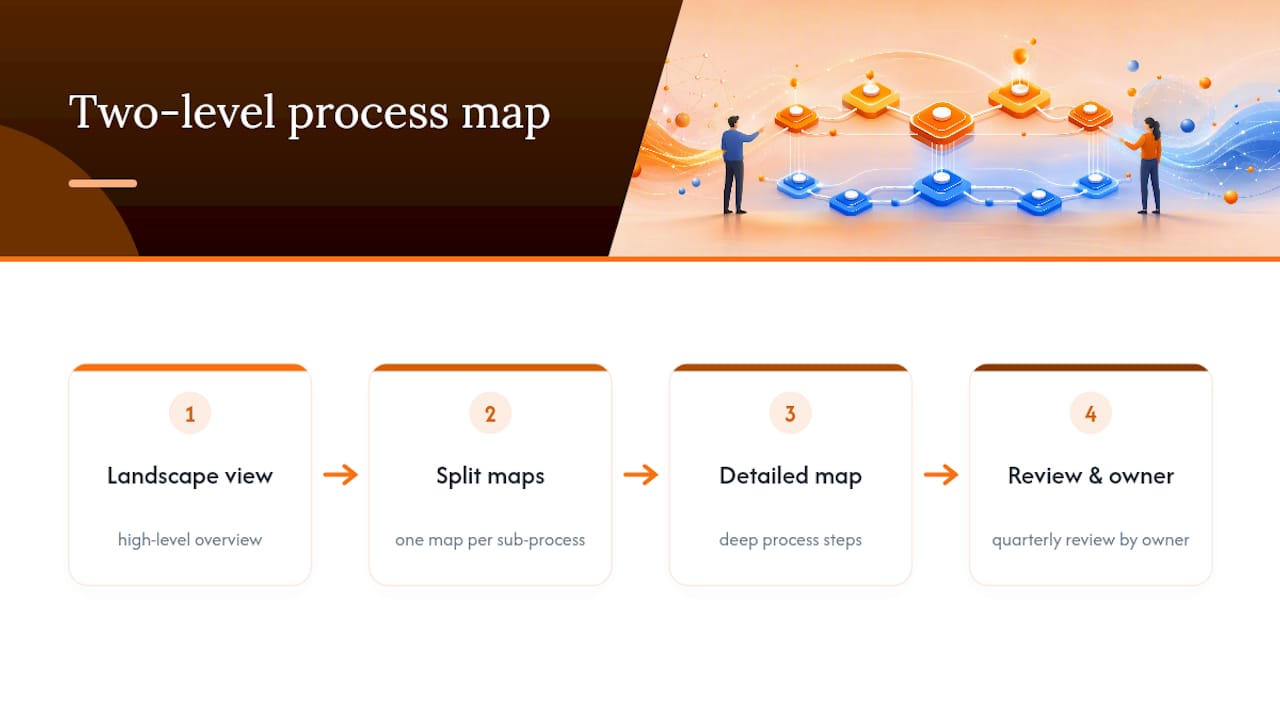
Experienced mappers also separate high-level landscape diagrams from detailed process diagrams, keeping an L0 value-chain view distinct from the granular version so documentation stays navigable instead of turning into one unreadable mega-chart.
How Does an Easy Whiteboard Support This Workflow?
The technical parts of process mapping (swimlanes, BPMN notation, export formats) matter less than whether your team will actually open the tool and use it. An instant, no-install canvas removes that friction: no account setup delay, no plugin, just a shared board within seconds.
For teams building this out further, the visual process documentation guide covers turning a live map into lasting SOPs, and the 2026 guide to online whiteboard tools for teams breaks down collaboration features in more depth. Try a five-minute exercise: paste in rough steps, assign a swimlane per role, and invite one teammate to react live.
Why Do Process Maps Fall Apart Mid-Project?
Most process mapping efforts don’t fail because the tool is bad. They fail because of predictable friction points that show up around the same stage every time.
The map gets too big to read. This usually means someone tried to fit an entire department’s workflow onto one canvas. The fix is splitting it into a high-level landscape view plus separate detailed maps for each sub-process, rather than one sprawling diagram nobody wants to open.
Stakeholders disagree on what actually happens. This is normal, not a sign you did something wrong. It means you found the gap between the documented process and the real one, which is exactly what a mapping session is supposed to surface. Resolve it live, in the session, not through a chain of comments over three days.
Nobody updates the map after launch. A process map with no owner decays fast. Assign someone (often whoever owns the swimlane with the most steps) to review it every quarter.
Remote participants can’t follow a live edit session. This is where present mode earns its place. Instead of asking someone to interpret a moving canvas, you walk them through it one step at a time, which keeps a distributed team on the same page without a narrated screen share.

Templates feel generic and don’t match your actual workflow. Treat a template as a starting skeleton, not a finished product. Delete what doesn’t apply before you add anything new. Fighting a template into submission wastes more time than starting with a mostly-blank swimlane grid.
Try Building Your First Map on Onlinewhiteboard
This tool provides a direct route to a working process map without the setup delay other tools add before you can draw a single box. It opens in your browser instantly, with no download and no account wall standing between you and a blank canvas, so a template and a swimlane grid are ready the moment you need them. Real-time sharing means the teammate who actually owns a step can jump in and fix it themselves instead of emailing you a correction.
The fastest way to see if this fits your team: open a process map template on Onlinewhiteboard, rough out your current-state flow, and invite one teammate to edit alongside you. If a five-minute session gets your first draft closer to reality, you’ve found your workflow.
Why Simple, Team-Driven Maps Win
The best process maps aren’t the most detailed ones. They’re the ones a team actually opens again. Complexity feels thorough, but it’s usually a sign nobody validated the map with the people doing the work. Start high-level, involve the room, and let the map earn its detail over time instead of front-loading it.
— A
Sources
- Business Analysis — Process Mapping (Notre Dame site)
- Free Process Map Template – Excel, Google Sheets | HubSpot
- Bpmn
- 5 common mistakes to avoid when mapping business processes | Clearwork
FAQ
Can I Create a Process Map Online?
Yes. Browser-based tools let you build, edit, and share a process map without installing software, using templates, swimlanes, and real-time collaboration to speed up the first draft.
Does Microsoft Have a Process Mapping Tool?
Microsoft offers process mapping capability through Visio, which supports flowcharts and BPMN-style diagrams. Many teams prefer a lighter, no-install whiteboard for faster starts and live collaborative editing.
What Is the Best Free Software for Process Mapping?
There’s no single universal answer since needs vary, but free, editable process map templates in Excel or Google Sheets are a solid starting point for identifying bottlenecks. For live, visual collaboration, a no-install whiteboard removes setup friction entirely.
What Is the Best Free Online Mapping Software?
The right pick depends on whether you need standards-compliant BPMN notation or a fast, visual working session with your team. For quick collaborative mapping with templates and swimlanes, a browser-based canvas requires no download or account setup to get started.