
TL;DR:
- Digital Socratic seminars use online tools and structured moderation to foster inquiry and critical thinking. Preparation with AI, clear phases, and active facilitation enhance engagement, while in-person dialogue remains more authentic. Combining digital prep with device-free live discussion yields the best learning outcomes.
Socratic seminar digital facilitation is the intentional use of digital tools and structured moderation techniques to conduct inquiry-based discussions that build critical thinking in online and hybrid learning environments. Unlike a standard Q&A session, a true Socratic seminar requires participants to question assumptions, build on each other’s ideas, and arrive at deeper understanding through dialogue. The challenge for educators is replicating that dynamic in a screen-based setting where nonverbal cues disappear and distractions multiply. The good news is that a combination of deliberate preparation, proven moderation methods, and the right digital tools makes it entirely achievable.
What is Socratic seminar digital facilitation?
Socratic seminar digital facilitation combines the classical Socratic method, rooted in Plato’s dialogues, with contemporary online learning design. The Socratic method works by replacing passive information transfer with guided questioning that forces participants to examine their own reasoning. In a digital context, that means using platforms, structured prompts, and active moderation to recreate the intellectual pressure of a face-to-face circle discussion.

The core benefit is measurable. Socratic AI systems integrated into mobile messaging environments significantly improve cognitive engagement and analytical thinking compared to standard discussion forums. That finding comes from a 12-week randomized trial with 72 master’s students. It means the format itself, not just the content, drives deeper thinking when implemented correctly.
Digital facilitation also scales in ways that physical seminars cannot. Structured digital deliberation platforms have produced over 4,000 ideas and 16,000 comments in just 7 days using systematic moderation and participant ratings. That scale shows what is possible when the right structure meets the right tools.
How do you prepare for a successful digital Socratic seminar?
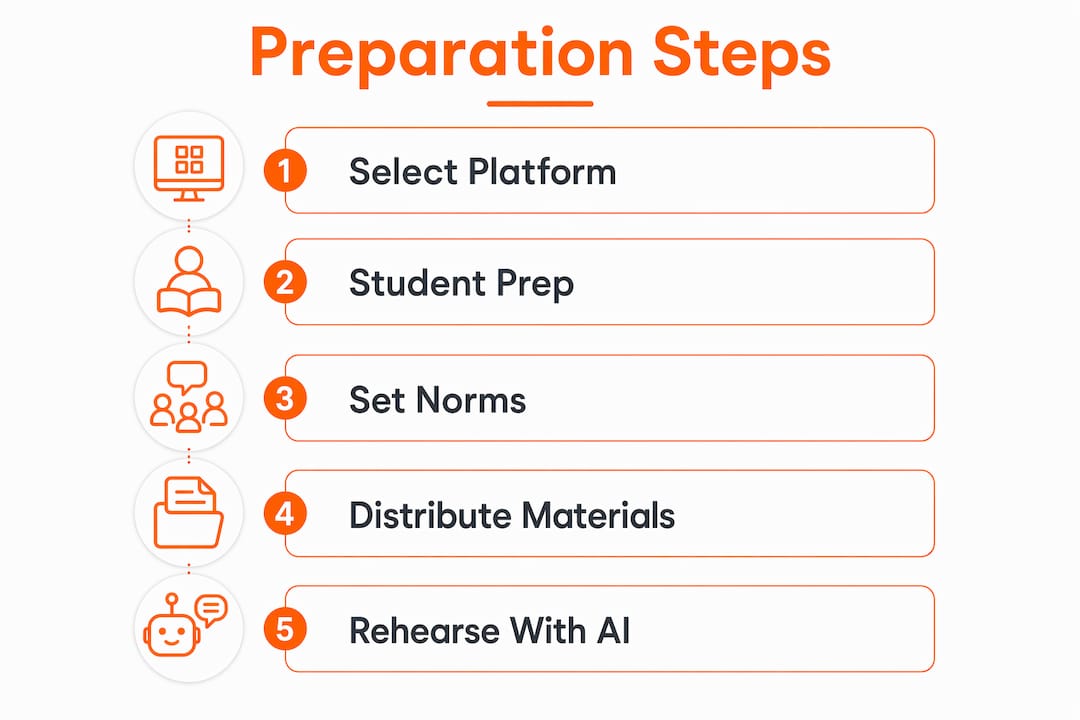
Preparation separates a productive digital seminar from a chaotic one. Educators need to address three areas before the session begins: platform setup, student readiness, and clear purpose setting.
Platform and technical setup
A reliable setup does not require expensive software. Digital backchannel setups that take under 10 minutes to prepare and require no user accounts consistently produce high immediate student participation, enabling discussions lasting 30 or more minutes with live grading running alongside. The practical lesson is to choose tools students can access instantly without friction.
| Setup element | Recommended approach |
|---|---|
| Video platform | Use a platform with breakout room and polling features |
| Discussion board | Select a tool requiring no student account creation |
| Shared document | Provide a live collaborative space for note-taking |
| Participation tracker | Use a side-by-side spreadsheet for real-time grading |
Student preparation strategies
Students who arrive unprepared produce shallow discussions. Assign a short written response before the seminar so participants arrive with a formed position. Peer review of those responses, done digitally, forces students to engage with opposing views before the live session even begins.
AI-based rehearsal tools add another layer. Socratic AI tools push students to unpack vague concepts into specific, answerable questions, replacing anxiety with focused critical thinking. Assigning a short AI rehearsal session as homework gives quieter students the confidence to speak up during the live discussion.
Pro Tip: Set a “post first” rule for any pre-seminar discussion board. Students must submit their own response before they can read classmates’ posts. This prevents groupthink and guarantees genuine independent thinking arrives in the room.
Scaffolding participation also matters. Provide sentence starters like “I agree with X’s point, but I want to add…” or “The evidence suggests a different conclusion because…” These lower the entry barrier for students who are strong thinkers but hesitant speakers. You can map these scaffolds visually using a digital classroom brainstorm activity board before the session.
How do you facilitate live synchronous digital Socratic seminars?
Live facilitation in a digital setting requires a different skill set than in-person moderation. The facilitator’s job is to stay mostly silent while keeping the discussion on track, a balance that is harder to strike on a video call.
The most effective moderation technique is “weaving.” Weaving involves synthesizing contributions to maintain motivation and discussion coherence. A facilitator who regularly says “Mia raised the point about X, and Jordan’s evidence seems to challenge that directly” keeps the conversation connected and signals to students that their contributions matter.
Practical tools that support live facilitation include:
- Chat as a parallel channel: Ask students to post questions or evidence in chat while a peer is speaking. This keeps engagement high without interrupting the speaker.
- Breakout rooms for small-group processing: Send students into pairs for 3 minutes to test an argument before bringing it back to the full group.
- Real-time polling: Use a quick poll to surface where the group stands on a claim before opening debate. It creates productive disagreement.
- Named discussion stages: Open each phase explicitly. Say “We are now moving into the analysis stage” so students know what kind of contribution is expected.
Handling dominant and quiet participants is the hardest part of live digital facilitation. For dominant speakers, use a visible turn-taking queue in the chat. For quiet participants, send a direct message mid-session: “You had a strong point in your pre-seminar writing. Would you share it now?” That targeted invitation works far better than a general “Does anyone else want to speak?”
Pro Tip: Mute all participants at the start and ask them to unmute only when they have a direct response to the previous speaker. This one rule eliminates crosstalk and forces active listening.
Keeping digital distractions minimal requires a clear norm set at the start. Ask students to close all tabs except the seminar platform and the shared reading. A brief 60-second focus check at the opening, where everyone confirms they are ready, builds the right mental frame for serious dialogue.
What are the best strategies for asynchronous Socratic facilitation?
Asynchronous digital seminars run over hours or days rather than a single session. They produce more thoughtful contributions because students have time to reflect, but they also risk losing momentum and dropping participation.
The solution is to stage the discussion in explicit phases. Naming discussion stages explicitly guides asynchronous groups effectively where tone and body language are absent. A four-phase structure works well in practice:
- Dialogue phase: Students post initial responses to the opening question within 24 hours.
- Analysis phase: Students respond to at least two peers, identifying agreements and contradictions.
- Plan-building phase: The group collectively identifies the strongest argument or the most unresolved tension.
- Accountability phase: Each student posts a brief reflection on how their thinking changed.
The opening post sets the tone for everything that follows. Write it as a genuine question with no obvious answer. “Was Atticus Finch a moral hero or a moral failure?” works. “What did Atticus Finch do in the novel?” does not. A strong opening question creates the productive discomfort that drives real inquiry.
Closing summaries are not optional in asynchronous seminars. A facilitator who synthesizes the week’s contributions and names the unresolved questions signals that the discussion was real work, not busywork. Students who feel heard return. Students who feel ignored do not.
Buried comments are a persistent problem in threaded discussions. Surfacing buried posts through targeted facilitator questions is a proven technique. Copy a strong overlooked comment into a new thread with a prompt: “This point from Alex has not received a response yet. How does it change the argument?” That move rescues good thinking and rewards the student who made it.
Pro Tip: Pilot your asynchronous structure with a small trusted group, such as a student council or an advanced section, before rolling it out to a full class. Small pilots reveal which prompts generate depth and which generate one-line replies.
How does AI improve Socratic seminar preparation and facilitation?
AI tools are most valuable in the preparation phase, not during the live discussion itself. The goal is to use technology to build student readiness, then step back and let authentic peer dialogue take over.
Successful digital Socratic seminars use a “prep-then-analog” model where digital tools help students rehearse arguments before a device-free live dialogue. The analog seminar preserves spontaneous peer interaction. Digital tools enrich the preparation phase. Keeping the live discussion device-free is a deliberate design choice, not a limitation.
| Phase | AI tool role | Human facilitator role |
|---|---|---|
| Pre-seminar prep | Argument rehearsal, question generation | Assign prompts, review written responses |
| Live seminar | Minimal or none | Weave contributions, manage pacing |
| Post-seminar reflection | Summarize key threads, flag gaps | Provide synthesis, assign follow-up |
AI tools that apply the Socratic method push students to define terms precisely before defending a position. A student who claims “democracy is the best system” gets pushed to define “best” and “democracy” before the argument can proceed. That kind of pre-seminar friction produces far stronger contributions in the live session.
Structured peer evaluations, done through a shared digital rubric, add another layer of preparation. Students who evaluate a peer’s argument before the seminar arrive with a clearer sense of what strong reasoning looks like. Pair this with an online whiteboard tool where students can map their argument visually before translating it into spoken dialogue.
Pro Tip: Use AI to generate three “devil’s advocate” questions for each student’s pre-seminar position. Students who have already defended their argument against a challenge arrive at the live seminar with far more confidence and evidence.
The case for keeping the seminar itself analog
After years of working with digital facilitation, the clearest lesson is this: technology belongs in the preparation, not the performance. The richest Socratic seminars I have observed use every available digital tool to get students ready, then ask them to close their laptops and talk to each other.
The reason is simple. A screen between participants creates a psychological buffer that reduces the social pressure to engage. When students sit in a circle without devices, they cannot hide. That discomfort is productive. It is the same pressure Socrates applied in the Agora, and it still works.
Visible facilitator presence through timely feedback and synthesis is the primary driver of motivation in digital discussions, not the tool itself. That finding reframes the entire technology question. The platform matters far less than what the facilitator does on it. A mediocre platform with an active, synthesizing facilitator outperforms a feature-rich platform with a passive one every time.
The hybrid model that works best pairs a device-free live seminar with a rich asynchronous follow-up. Students leave the live session with unresolved questions, then work through them in a structured online thread over the following 48 hours. The two formats reinforce each other. The live session creates urgency and connection. The asynchronous thread creates depth and reflection. Neither format alone delivers both. You can support this structure with visual curriculum tools that help students map the discussion arc before and after the live event.
— A
Onlinewhiteboard for digital seminar facilitation
Onlinewhiteboard gives educators a clean, shared canvas that fits naturally into the preparation and follow-up phases of a digital Socratic seminar. Before a live session, students can map their arguments, annotate shared texts, and organize evidence visually without any software download or account setup. During asynchronous phases, the board serves as a living document where the facilitator can surface buried ideas, post synthesis notes, and keep the group’s thinking visible in one place. The real-time collaboration features mean every participant sees updates instantly, which keeps the discussion moving even across time zones. Start your next seminar with a free online whiteboard and see how a shared visual space changes the quality of student preparation.
FAQ
What is a Socratic seminar in a digital context?
A digital Socratic seminar is a structured, inquiry-based discussion conducted through online platforms where participants question assumptions and build on each other’s reasoning. The facilitator guides rather than lectures, using moderation techniques to maintain depth and focus.
How do you keep students engaged in an online Socratic seminar?
Active facilitator weaving, named discussion stages, and targeted invitations to quiet participants are the most effective engagement strategies. Research shows that visible facilitator synthesis drives motivation more than the platform itself.
What is the “post first” rule in digital discussion facilitation?
The “post first” rule requires students to submit their own response before reading classmates’ contributions. This prevents groupthink and guarantees that independent thinking enters the discussion before social influence shapes it.
Can AI tools replace the facilitator in a Socratic seminar?
AI tools are effective for pre-seminar preparation and argument rehearsal, but they do not replace the human facilitator. The prep-then-analog model uses AI in preparation and reserves live facilitation for a human who can synthesize, redirect, and respond to the room.
How long should an asynchronous Socratic seminar run?
A four-phase asynchronous seminar typically runs 48–72 hours per cycle, with each phase lasting 12–24 hours. Shorter windows reduce reflection quality; longer windows cause participation to drop off as urgency fades.
Key takeaways
Effective Socratic seminar digital facilitation depends on active facilitator presence, structured preparation, and deliberate phase management, not on the sophistication of the platform.
| Point | Details |
|---|---|
| Preparation drives quality | Assign written responses and AI rehearsal before the live session to build student confidence. |
| Weaving is non-negotiable | Facilitators must synthesize contributions regularly to prevent the “void effect” and keep students engaged. |
| Name every discussion stage | Explicitly labeling phases like dialogue, analysis, and plan-building guides participants where nonverbal cues are absent. |
| Pilot before scaling | Test asynchronous structures with small groups to refine prompts and moderation moves before full rollout. |
| Keep the live seminar device-free | Digital tools belong in preparation; the live discussion produces the most authentic dialogue without screens. |