
TL;DR:
- Digital facilitation of the jigsaw method uses online tools to promote cooperative learning in virtual settings. Proper platform features and structured checks improve group transitions, accountability, and creative problem-solving through AI prompts. Effective preparation and visual collaboration spaces help maintain engagement and ensure successful remote jigsaw sessions.
Jigsaw activity digital facilitation is the structured process of adapting the cooperative jigsaw learning method for virtual or remote settings using digital collaboration and communication tools. Originally developed by Elliot Aronson in 1971, the jigsaw method creates interdependent learning by having students master one segment of a topic, then teach it to peers in a home group. The digital version preserves that structure while adding breakout rooms, collaborative whiteboards, and asynchronous video to replace physical group movement. For educators and facilitators running virtual classrooms or remote team sessions in 2026, mastering this method means combining sound pedagogy with the right platform choices.
What digital tools enable effective jigsaw activity facilitation?
The right platform makes or breaks a digital jigsaw session. Three categories of tools cover the full workflow: synchronous communication, asynchronous collaboration, and group management.

Synchronous communication tools handle live group work. Video conferencing platforms with breakout room features let you pre-assign participants to expert groups and home groups before the session starts. Persistent breakout rooms reduce wasted time because participants return to the same virtual space rather than waiting for a facilitator to reassign them. Platforms that offer multi-group monitoring let facilitators observe several groups at once without disrupting any of them.
Asynchronous collaboration tools extend the method beyond live sessions. Expert groups can record short video explanations of 2–3 minutes using platforms like Flip, giving home group members a reference they can rewatch. This approach also creates a contribution trail, which helps facilitators verify individual accountability after the session ends.
Collaborative whiteboards serve as the shared thinking space for both phases. Onlinewhiteboard gives each group a live digital canvas where members can map ideas, annotate shared documents, and organize their expert segment findings before presenting to their home group. The visual record stays accessible after the session, which supports review and assessment.
| Feature category | What to look for |
|---|---|
| Synchronous communication | Pre-assigned breakout rooms, persistent group spaces |
| Asynchronous collaboration | Video recording, timestamped contributions |
| Group management | One-click transitions, multi-group facilitator view |
| Shared workspace | Real-time whiteboarding, exportable session records |
Pro Tip: Choose platforms that allow one-click group transitions and let you monitor multiple rooms simultaneously. Reducing transition friction by even one minute per switch adds up to significant time savings across a full session.
How do you plan and execute a digital jigsaw session step by step?
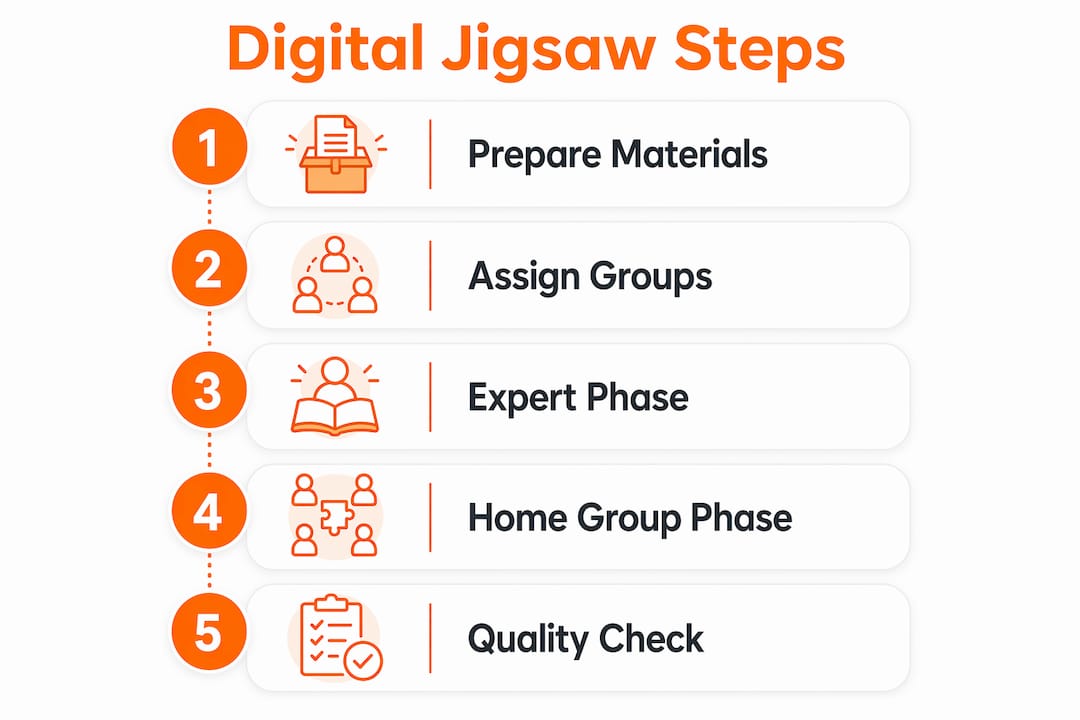
Good execution starts well before the session opens. Follow this sequence to run a clean digital jigsaw from start to finish.
-
Segment the topic. Divide your content into 3–5 distinct, roughly equal parts. Each segment should be learnable independently and meaningful when combined with the others. Avoid segments that require prior knowledge of another group’s material.
-
Assign groups and distribute materials. Send each participant their expert group assignment and reading materials at least 24 hours before the session. Pre-loading assignments prevent confusion at the start and gives participants time to preview their segment.
-
Open expert groups (15–20 minutes). Participants join their assigned breakout rooms and study their segment together. Use Onlinewhiteboard to give each expert group a dedicated canvas section for notes and diagrams. Facilitators should check in briefly to confirm groups are on track.
-
Run a quality check before home groups form. Most jigsaw failures stem from “piece learning,” where a student returns to the home group without fully mastering their segment. A short quiz, a rubric check, or a facilitator question during the expert phase catches gaps before they spread.
-
Transition to home groups (20–25 minutes). Each home group now contains one expert from every segment. Experts teach their peers in sequence. Facilitators monitor via multi-group view and intervene only when a group stalls.
-
Debrief synchronously (10 minutes). Bring all participants back to the main room. Ask each home group to share one key insight. This step reinforces learning and surfaces any remaining misconceptions.
-
Collect asynchronous evidence. After the live session, have participants submit a brief written reflection or a recorded summary. Combining asynchronous video with synchronous debriefs builds a stronger assessment record than either format alone.
The Jigsaw II variant adds a layer of accountability by having all participants read the full text before expert groups form. This means every learner enters the session with baseline knowledge, which reduces the risk of critical gaps during peer teaching.
What challenges arise in digital jigsaw facilitation?
Digital jigsaw facilitation requires deliberate scaffolding to overcome obstacles that do not exist in face-to-face settings. Knowing the most common pitfalls lets you address them before they derail a session.
-
Uneven expert mastery. When one expert group misunderstands their segment, every home group that includes a member from that group receives flawed information. Formative checks during the expert phase are the only reliable fix.
-
Slow group transitions. Moving participants between breakout rooms manually wastes time and breaks concentration. Persistent group rooms and pre-assigned transitions solve this. Platforms with quick student movement between groups reduce downtime and keep engagement high.
-
Dominant participants. In virtual settings, quieter learners are easier to sideline than in physical classrooms. Structured turn-taking guides and timed speaking slots prevent one voice from filling the room.
-
Weak group connection. Participants who never interact outside their assigned roles feel less invested. Assigning persistent group rooms that stay open between sessions builds familiarity over time.
-
Facilitator blind spots. Without a physical room to walk through, facilitators can miss struggling groups entirely. The solution is a platform view that shows all groups simultaneously.
“Strong social norms, structured collaboration guides, and AI prompts help prevent dominant participants from overshadowing quieter learners in digital settings. Social skill requirements remain critical; generative AI can encourage more balanced participation.”
Pro Tip: Use your platform’s “peek” feature to drop into breakout rooms for 60–90 seconds without announcing yourself. Silent observation gives you an accurate picture of group dynamics and lets you offer just-in-time support without disrupting the group’s flow.
How can generative AI enhance digital jigsaw activities?
Generative AI moves the jigsaw method beyond knowledge transfer into creative problem-solving. The standard jigsaw structure asks experts to share what they know. AI prompts push groups to ask what they could create with that knowledge under new constraints.
A 2026 study demonstrated this directly. Researchers used AI prompts to have groups redesign classroom illustrations under hypothetical budget constraints. Groups that received these prompts produced more original solutions than groups working without them. The constraint forced participants to apply expert knowledge rather than simply report it.
Hypothetical constraints trigger innovative problem-solving by pushing learners past the boundaries of their assigned segment. A budget cut, a missing resource, or a fictional client requirement gives the group a reason to combine their expert knowledge in new ways. This is what researchers call “horizontal expansion,” where learners contribute interdisciplinary ideas rather than staying within their assigned lane.
Facilitators can integrate AI into the jigsaw workflow with these strategies:
- Provide each expert group with an AI-generated scenario prompt after they master their segment. Ask them to apply their knowledge to the scenario before joining the home group.
- Use AI to generate follow-up questions during the home group phase, targeting gaps in the group’s combined understanding.
- Have AI summarize each group’s whiteboard notes at the end of the session, giving facilitators a quick overview of what each group covered.
- Encourage balanced participation by using AI prompts that specifically invite quieter participants to respond first.
The equity consideration matters here. AI prompts work best when every participant has equal access to the tool and equal comfort using it. Facilitators should introduce AI features explicitly and allow a short practice round before the main session.
Key Takeaways
Effective digital jigsaw facilitation combines Elliot Aronson’s cooperative learning structure with purpose-built digital tools, quality checks at every phase, and AI-assisted prompts that push groups from knowledge sharing to creative problem-solving.
| Point | Details |
|---|---|
| Quality checks prevent failure | Run a quiz or rubric check during the expert phase before home groups form. |
| Platform choice drives efficiency | Choose tools with persistent breakout rooms and multi-group monitoring to cut transition time. |
| Asynchronous tools extend reach | Short expert videos on platforms like Flip create accountability trails and support review. |
| AI prompts deepen engagement | Hypothetical constraints push groups beyond knowledge transfer into original problem-solving. |
| Social norms protect equity | Structured turn-taking and timed speaking slots prevent dominant voices from sidelining quieter learners. |
What I’ve learned from running digital jigsaw sessions
The biggest mistake facilitators make is treating the jigsaw method as a content delivery mechanism. It is not. The method’s power comes from the social contract between experts and their home group peers. When that contract breaks down, because an expert is underprepared or a dominant voice takes over, the whole session collapses faster online than it ever would in a physical room.
What actually works is building accountability into every transition. I have seen facilitators skip the quality check because they trust their participants. That trust is misplaced until it is earned through the session itself. A two-minute quiz at the end of the expert phase is not punitive. It is the mechanism that makes peer teaching credible.
The AI integration angle is genuinely exciting, but it requires restraint. The 2026 research on horizontal expansion through AI is compelling, but facilitators who pile on too many AI prompts at once end up with groups that are confused rather than creative. One well-chosen constraint prompt per session is enough to shift the energy. Add more only after your group is comfortable with the basic structure.
The facilitators who run the best digital jigsaw sessions are the ones who do the most work before the session starts. Group assignments, material distribution, platform setup, and quality check design all happen in advance. The live session itself should feel almost effortless because every decision has already been made.
— A
Onlinewhiteboard as your digital jigsaw workspace
Running a jigsaw session online requires a shared space where expert groups can think visually and home groups can see the full picture come together. Onlinewhiteboard provides a clean digital canvas that works alongside your video conferencing setup without requiring any software downloads or complicated configuration.
Each expert group gets its own section of the free online whiteboard to map their segment, annotate diagrams, and prepare their peer teaching materials. When home groups form, the full board becomes a shared reference that every participant can view and contribute to in real time. The session record stays available after the meeting ends, which supports both review and assessment.
Facilitators running remote team sessions or virtual classrooms can find additional guidance on whiteboard tools for teams to match the right features to their specific jigsaw format.
FAQ
What is the jigsaw method in digital learning?
The jigsaw method is a cooperative learning structure where participants master one segment of a topic as “experts,” then teach it to peers in a mixed “home group.” In digital settings, breakout rooms and collaborative whiteboards replace physical group movement.
How do you manage group transitions in a virtual jigsaw session?
Use platforms with persistent breakout rooms and pre-assigned groups to eliminate manual reassignment. Platforms that support quick student movement between groups reduce downtime and keep participants focused.
What is Jigsaw II and how does it differ from the original?
Jigsaw II requires all participants to read the full text before expert groups form, adding a layer of baseline knowledge. The original method assigns only one segment per participant, which increases the risk of gaps when experts are underprepared.
How does generative AI fit into a jigsaw activity?
AI prompts give expert groups hypothetical constraints that push them to apply their knowledge creatively rather than simply report it. A 2026 study found that groups using AI scenario prompts produced more original solutions than those working without them.
How do you prevent dominant participants from taking over in virtual jigsaw groups?
Structured turn-taking guides, timed speaking slots, and AI prompts that invite quieter participants to respond first all reduce the risk of one voice dominating. Social norms set at the start of the session are the most reliable long-term fix.